
Keep your signing key safe
Every game you patch is signed with a key that lives only on your device. Keep a backup, and future fixes install without uninstalling.
What you need
- The Blockheads Patcher (web, desktop or Android)
- A safe place for one small file, and a password you can remember
1. Know what the key does
The Patcher creates the key the first time you patch. Android only installs an update over your fixed game if both are signed with the same key. A new key means uninstalling again — and losing local worlds unless you back them up.
WARNING
Keep it private. Anyone with your key could make apps that look like updates to your game.
2. Export a backup
Open Signing keys and choose Export backup…. Set a password, repeat it and tap Save backup. You get a .json file, by default blockheads-patcher-key.json.
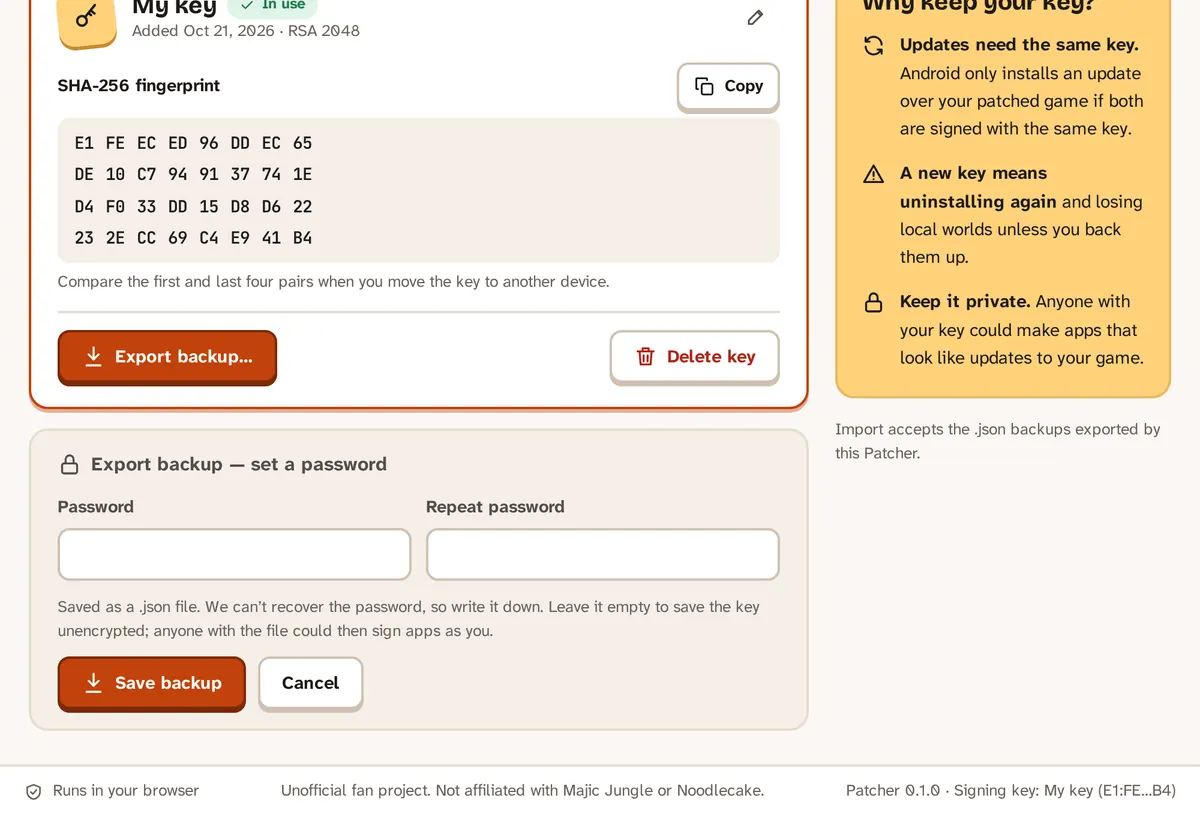
Export a password-protected backup of your signing key.
TIP
We can’t recover the password, so write it down. Without a password the file is not encrypted, and anyone with it could sign apps as you.
3. Move it to another device
On the new device, open Signing keys, choose Import key and pick the .json file. Enter the backup password, then tap Use this key.
Compare the first and last four pairs of the fingerprint on both devices to be sure it is the same key.
4. If the key is lost
Without a backup you can’t update games patched with that key. Back up your worlds, uninstall the fixed game and patch again with a new key. How to back up worlds
If something goes wrong
- The web Patcher keeps the key in your browser’s storage for this site. Clearing the site’s data removes it — export a backup first.
- Import accepts only the
.jsonbackups exported by the Patcher. - Questions? Ask on GitHub.